Welcome to my blog! Here, I will share my experiences with life directly outside of college. I will also offer resources and tips for those who are searching for the perfect career, getting a good start on their career, or attaining a simple job. I hope you will find this blog helpful. Please share with your friends on Facebook and Twitter
I will be reviewing The Career Playbook by
James M. Citrin. I bought the Kindle edition, which is around $7.47. You can uy
the paperback version from Amazon for $7.86. Barnes & Noble is selling it
for 7.86 too. It is also available as an audible book, for those of who don’t
like to read, and they are selling it for $14.95.
The book contains 258 pages and is a
quick and easy read. It’s a nice little
book providing enough practical information without getting too overwhelming. This book provides essential advice for those
of us who are transitioning from academia to the professional workforce.
Although much of the advice presented in this book is pretty much common sense,
he does provide some helpful tidbits of information that seem useful.
At the start of the book, Citrin describes
the six phases of your career, which I found to be the most interesting part of
the book. He gives examples and tips for writing a resume and a cover letter.
Also, there is a whole chapter devoted to how to prepare for an interview. I
find it hard to develop questions to ask employers when they ask me if I have
any questions and the author provides example questions to ask and how to
gather information and ideas for these questions.
Not
only does he provide tips and helpful information to attain a job, but how to
further develop your career as you move along. I would recommend this book to
anyone who is a recent graduated from college and is conducting their job
search.
Next,
I will provide a review for The Get it
Together Guide to Figuring out What to do with Your Life, which I will post
sometime next week. Please subscribe and share!
Linkedin
is a social media network for business professionals and companies. It’s a
fantastic way to gain connections, market yourself to potential employers, and
search for jobs. Furthermore, it’s one of the many ways employers can find you
online.
I havea friend who was interviewingto hire an IT programmer for her company. One of the
initial leading candidates for the position didn’t make the cut. One reason was
because he didn’t have a Linkedin profile. “He was an IT guy,” she told me. “You
would think he would have a Linkedin profile!” Therefore, I consider having a
Linkedin profile to be crucial in your job or internship search. If you do not
have a profile on Linkedin, I would suggest you
should create one.
Here
are 8 ways to boost your profile:
1. Use a Professional Photo as your
Profile Pic. According
to Linkedin, providing a photo makes your profile 7 times more likely to be
found in searches. Profiles without photos are likely to be perceived as
incomplete or inactive and are less likely to be viewed. Avoid photos with
pets, kids, significant others, and anything that can be viewed as
inappropriate. That lovely Facebook photo of you and your sister at her wedding,
doesn’t work.
Also,
be sure you are in business attire when you take the photo. If you want your
photo to be exceptional and professional as possible, go to a professional
photographer. However, if you are on a budget, grab a friend with a nice camera
or a camera phone with excellent quality. Have him or her take the photo of you
in a professional background. Pick a background that isn’t too distracting. A
room with a red or white wall with good lighting that doesn’t reveal your
shadow would be the best place.
2. Create a Noteworthy Headline and
Include your Industry and Location. You have 120 characters to inform
potential employers what you do. Don’t just use your job title, include your areas
of expertise for which you would like to be known and found in searches. You
may also want to include areas of interests and locations you are interested in
working. Using brief, informative, and noteworthy keywords will help employers
find you and lead to more profile views. For example, my headline is “Video
Production Intern at [Company]. Interested in Multimedia, Journalism, Writing,
Blogging in Big City Areas.”
Other
examples: “Experienced Transportation Executive
at [Company] in New York”; “Web Designer and Information Architect at [Company]
in Los Angeles”. If you don’t have a job currently and you’re interested in
going into the Film and Television industry in Los Angeles, you may write:
“Recent College Grad Seeking Entry-Level Jobs. Interested in Film and
Television in Los Angeles.”
3. Have a Killer Summary. Think of your
Linkedin profile summary as your digitalized elevator pitch. This is the chance
for you to describe who you are, what you do, what you have done, what you are
passionate about, and what makes you unique. People are viewing your profile
because they are interested in learning about you, so be sure to distinguish
yourself from others. Also, your summery isn’t your professional résumé, so
make it sound personal and conversational. Tell stories and paint a picture of
yourself, but remember to keep it professional. As always, be sure to proofread
your summary before posting.
For
an elaborate example, here is my summary: “I am a member of the class of 2015
at [College/University] with a Bachelor of Arts degree in Communication Studies
and I am interested in pursuing a career in Multimedia Journalism and Writing,
but my dream job is to be a travel writer. I absolutely love to travel abroad
and get giddy whenever I prepare to go on a trip. During my time at [College/University],
I was involved in the student newspaper, theatre, and was a brother of a service fraternity, Alpha Phi Omega. I also
took an intensive course on writing film reviews and a three-day screenwriting
workshop under the instruction of Joe Boucher, a producer of The Simpsons and
King of the Hill.”
4. Add your Current Position and Previous
Work History.
According to Linkedin, having your two most recent positions makes your profile
12 times more likely to be found. Be sure to leave a description with your
current position and at least two or more previous positions. Also, add any
corporate and volunteer positions that would be of interest to job recruiters.
Since
it’s not your resume, you shouldn’t go overboard with your previous job
experiences. A simple brief summary and some top accomplishments should be
fine. That job you did as a rabbit whisperer won’t cut it. However, you could
add that to your summary as an interesting fact. As a recent grad, it is
acceptable tolist jobs you had while in high
school and in college, as well as internships and fellowships.
5. Add Skills and Expertise. The skills and
expertise section of your Linkedin profile gives you an opportunity to showcase
the specific and detailed areas of your expertise. You should avoid being too
vague or general, but rather list specialties. Adding skills and expertise also
gives your connections the ability to endorse you in those skills.
You
should list at least 5 skills, minimum. The average skills a college grad
attains that you can add to your skills if you haven’t already: Microsoft
Office; Social Media; Facebook; Twitter; YouTube; Teamwork; Research; Public
Speaking; Event Planning.
6. Include your Education. Don’t forget to
add your education details in your profile. Add higher education school(s) you
attended, degrees received (including minors and concentration), awards (can
include making the Dean’s List), notable clubs and organizations (ex. Alpha Phi
Omega, Chamber Chorale, Debate Team, Quiz Bowl, Student Activities Board, Young
Republicans/Democrats).
Also,
if you’ve studied abroad for a semester or more, you should add the university
you attended, which country, how long you were there, relevant courses, and any
clubs and organization in which you were involved. One of the many benefits of
adding the school(s) you attended is that it allows you to connect with fellow
classmates and alumni to find you and connect.
If
you didn’t finish your degree, you should still include information about your
attendance. If you didn’t attend college, it is better to list the high school
you attended than having no education details at all. Not adding your education
details will leave your profile incomplete and raise unnecessary
questions.
7. Provide your Contact Information. If you wish to be
contacted by job recruiters or those who want to help you succeed, you should
add your contact information. At a minimum, to protect your privacy, only give
your email and phone number. Be sure it’s an appropriate email address that you
check regularly and that the phone number you provide is associated to a phone
you use regularly.
8. Get Connected. Linkedin requires
that you have at least 50 connections. This can be easily accomplished by browsing
connections. Go to your Linkedin homepage. Then, hover your cursor over the
“Connections” tab between “Profile” and “Jobs” on the bar near the top of the
page. There will be a pull-down menu, click on either “Add Connections” or
“Find Alumni.” In “Add Connections” you can upload contacts from Gmail,
Outlook, Hotmail, etc. by logging in to your personal email and see who has a
Linkedin profile. “Finding Alumni” will provide you separate lists of students
and alumni, notables, and recommendations from the school(s) you attended. One
piece of often-ignored advice is to write a simple personal message when you
send out invitations to connect. There
you go, eighttips on how to attain an
all-star Linkedin profile! A complete and compelling profile helps you stay
connected and broadens your personal brand. Regularly update your profile and
keep it fresh. Imagine your profile as another Facebook profile. You should
give your Linkedin profile as much attention as you give to Facebook if you
want to maintain an all-star profile and a good start to your career. And don’t
forget to proofread!
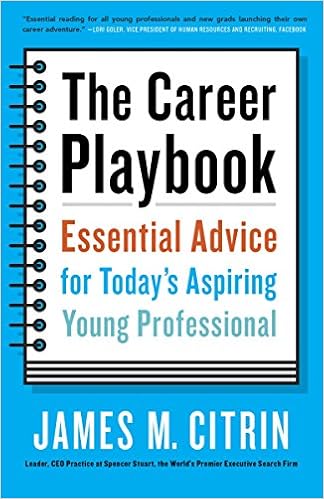 I will be reviewing The Career Playbook by
James M. Citrin. I bought the Kindle edition, which is around $7.47. You can uy
the paperback version from Amazon for $7.86. Barnes & Noble is selling it
for 7.86 too. It is also available as an audible book, for those of who don’t
like to read, and they are selling it for $14.95.
I will be reviewing The Career Playbook by
James M. Citrin. I bought the Kindle edition, which is around $7.47. You can uy
the paperback version from Amazon for $7.86. Barnes & Noble is selling it
for 7.86 too. It is also available as an audible book, for those of who don’t
like to read, and they are selling it for $14.95. 

